What We Learned Replacing Two Vendor Platforms, and What We Changed the Second Time
Featured image
The first replacement took about 10 months from first code to production, without Claude Code. The second, now on the test environment, started from the design, and Claude Code turned that design into documentation and specifications.
Maryna Oliinyk·Product Designer at Provectus
Kostiantyn Kuzmishen·Team Lead & Product Owner at Provectus
Oleg Galenia·Tech Lead at Provectus
Nikita Rotar·Application Developer at Provectus
Yehor Ishchenko·Application Developer at Provectus
October 27, 2026·11 min
BUSINESS SUMMARY
What two vendor-platform replacements for the same client have in common, and what we changed the second time: design first, then Claude Code.
Our client is a US furniture company with in-house field crews. Customers order on its website, the warehouse prepares each order, and dispatchers plan the day’s operations (crews’ jobs at customers’ sites) on a map and a list. Crews get their operations on their phones and close each one with a checklist. Provectus maintains the operations system, as well as the staff mobile app.
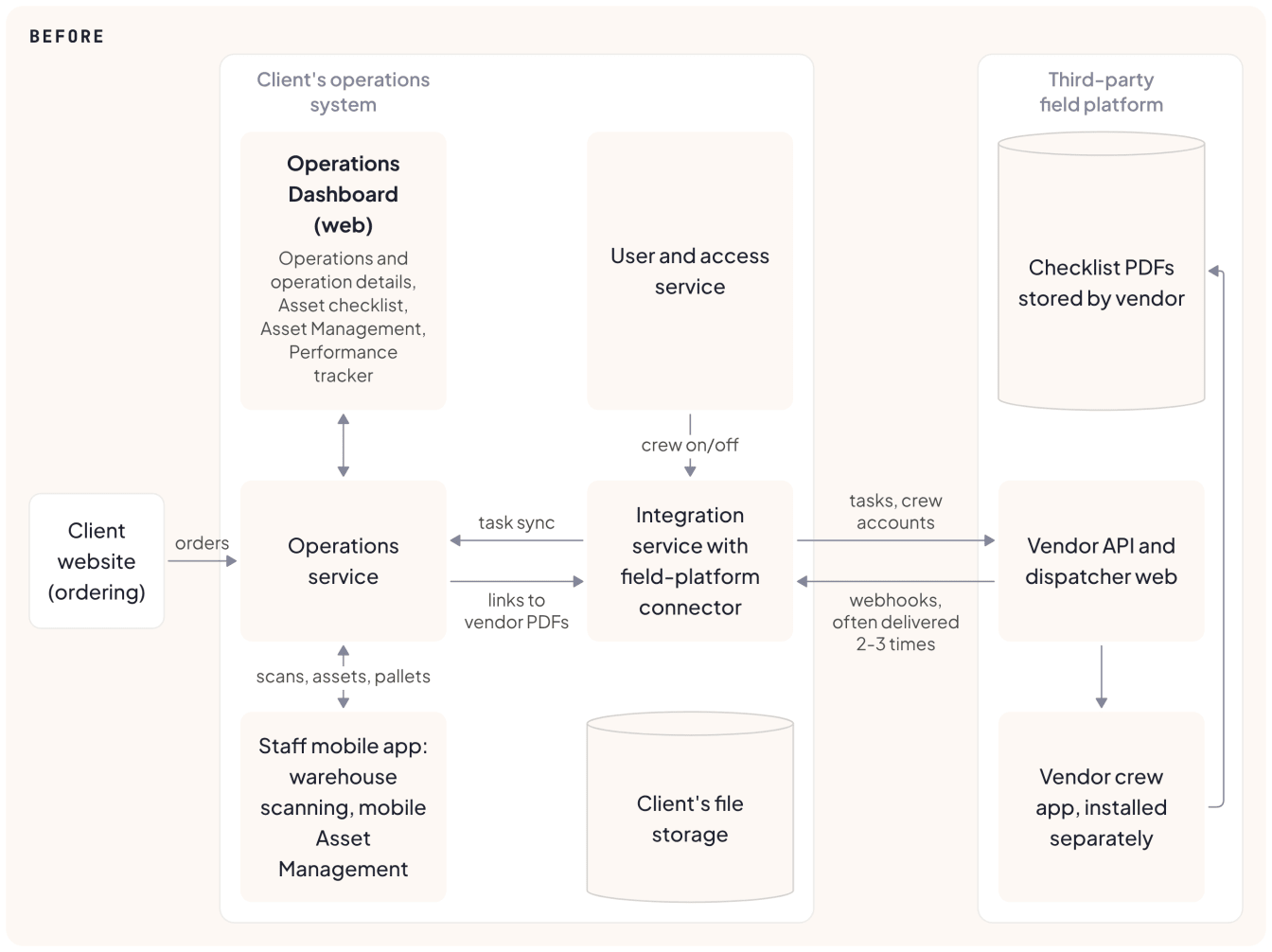
For years, the client relied on third-party platforms. One tracked more than 70,000 assets. The other, a field service management platform, dispatched the crews. Every task, crew assignment and stock count had to match in two systems. On the dispatch platform alone, that meant dozens of tickets since 2022, about half of them bugs.
We replaced the asset-tracking platform first. It took about 10 months from first commit to production, and the sync bugs stopped once there was one system. Field operations is next, with the same team shape but a different method. The requirements were settled in the design first, screen by screen with the client, and Claude Code turned the design into documentation and specifications and keeps them current. The new module is on the test environment now. The build is planned to finish by the end of the year.
This article is for engineering and product leaders deciding whether to replace a vendor platform with custom software, and how to run the build with Claude Code.
01 The Real Cost of Running Two Systems
The client’s requirements document called the field-operations platform limited. It carried features nobody used and lacked others the client needed. Our ticket history shows the cost of running two systems. Most of the dozens of tickets that named the platform came from keeping the two in agreement, with tasks duplicated, missing, or left behind after an operation was canceled.
Two examples:
The 201 that switched the webhook off. The client noticed the vendor’s log was full of “201” responses. The vendor treats anything other than 200 as a failure and, after enough of them, turns the webhook off. Our endpoint was answering “201 Created” by default. The fix was one line and went to production the same day. Finding it took a client reading a vendor log.
Canceled, but still on the schedule. When an operation was canceled in the operations dashboard, its event came back on the shared Outlook calendar about a minute later, and its task was not removed from the vendor platform at all. Rebuilding the timeline from the logs of two services showed two defects: a recent regression on the calendar side, and a step that should have removed the task from the vendor platform but had never been built. We fixed both, and canceled operations now leave the calendar and the vendor platform together.
Both defects were in the integration between the two systems. We could fix each one, but every task still had to cross that integration, and one system removes this whole class of defect. Retiring the platform also ends a subscription we estimate, from the vendor’s public pricing, at tens of thousands of dollars a year.
02 The First Replacement: Asset Tracking
A team of five built the replacement without Claude Code: three developers (backend, web, and backend and mobile), a designer, and a team lead who also covered delivery management, requirements and QA. A DevOps engineer helped as needed.
about 10 months from the first commit to production, about 11 counting design
one overnight cutover that moved more than 70,000 assets while the vendor’s API answered slowly enough to push us past the planned window
the sync bugs stopped. Each operation’s asset checklist was in the client’s dashboard while the assets and consumables were in the vendor’s system, so statuses, stock quantities and which assets belonged to which operation kept drifting apart: about 20 clear cases in the tracker. With one system there is nothing to sync, and what remains are ordinary regressions from new features, fixed in our code
the asset data, now in the client’s system, carries features the vendor tool never offered: AI-assisted checklist assignment, and inventory forecasting, live since August 2026 and in active use. The forecasting’s business impact has not been measured yet
Field operations has the same team shape, with the same designer and the same team lead.
03 A Requirements Document That Didn’t Answer Everything
Field operations started from the client’s product requirements document, or PRD. It described some parts of the application in detail, down to how a pasted link should behave in a note; other parts had few requirements or none.
We made one early mistake. Right after the PRD arrived, we cut tickets one per requirement: bold text in one ticket, list indentation in another, sorting and grouping in separate tickets. Without the design, nothing grouped them into modules and screens, and they read as a list of small features. We grouped them by module first, but the plan that got built came later, from the design, and replaced them entirely.
04 A Prototype Before a Single Line of Code
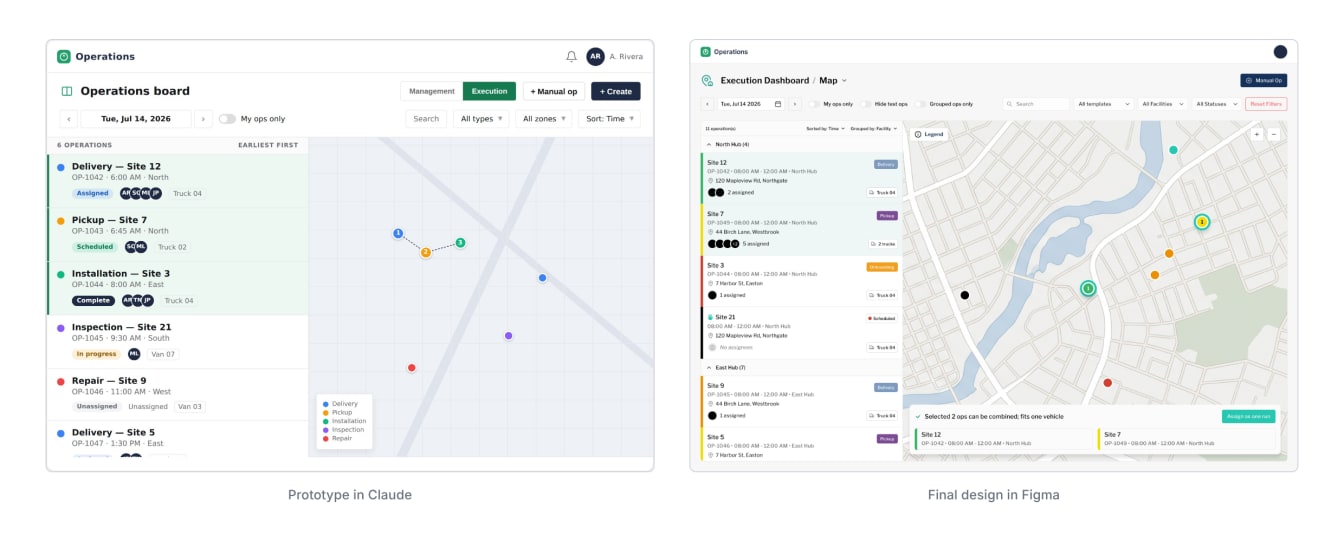
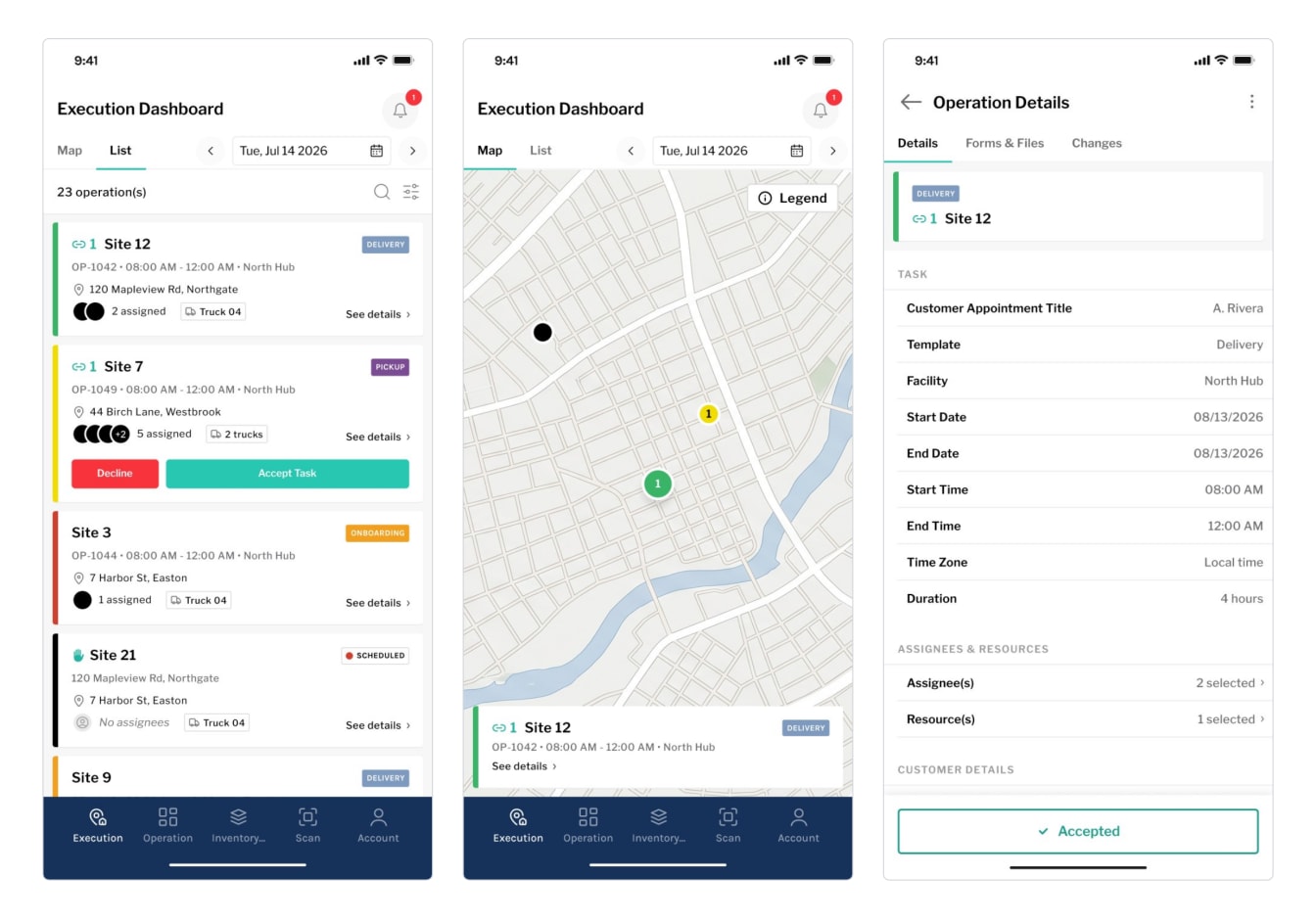
Design work started alongside the regrouping of the tickets. Two months in, our product designer, Maryna Oliinyk, started building an interactive prototype with Claude. Claude worked from the designs of the client’s current operations dashboard, the PRD and the client’s design system in Figma, so the prototype used the client’s real styles. It covered the core of the desktop module: the day’s operations as a list and on a map, the detail view of an operation, and creating operations from templates. The mobile app was set aside for a separate session, with a summary of its requirements prepared in advance.
Building the prototype exposed gaps in the written requirements. They mostly described what should change compared with the old system, as if the reader already knew the vendor platform. We maintain the operations system every day. The vendor platform we knew less well, and that became clear only partway in. From then on, Claude also worked from screenshots of the vendor platform.
“The prototype quickly showed where the requirements leaned on the old system without saying so,” says Maryna. “Those gaps are better found before development than in the code.”
05 We Went Through the Client’s Existing Process
The team then went through the client’s existing process: how dispatchers plan the day, assign crews and track the work, and which templates, forms and statuses the client actually uses.
The walkthrough turned up details the requirements had simplified or skipped, down to how many kinds of operation there are, and showed which features the client used and which it did not, so only a few questions went back to the client. One asked what status lifecycle an operation should have if someone creates it by hand, unconnected to the dashboard, and who may change that status. The client’s operations team came back with an eight-step lifecycle, mostly driven by the system, with manual changes only from the desktop.
People were fast in the old interface, so the new one keeps its logic. The map stays next to the list, and the operation colors come from the vendor’s templates, in softer shades.
06 The Requirements Took Shape in the Design
We worked the requirements out in the design. Maryna drew the screens in Figma with Kostiantyn Kuzmishen, the project’s team lead and product owner. The client’s team leaders, subject-matter experts and crew members reviewed them, and so did our engineers. Each question was settled in the comment thread on the screen it concerned.
Every call went into a decision log with the discussion it came from. More than 80 decisions are recorded so far; about 20 drop or defer a vendor feature, each with its reason:
some features were unused
some were already covered by our platform (notifications, permissions, users)
a few were deferred because they carried regression risk for little value
07 From Design to Documentation, Specifications and Code
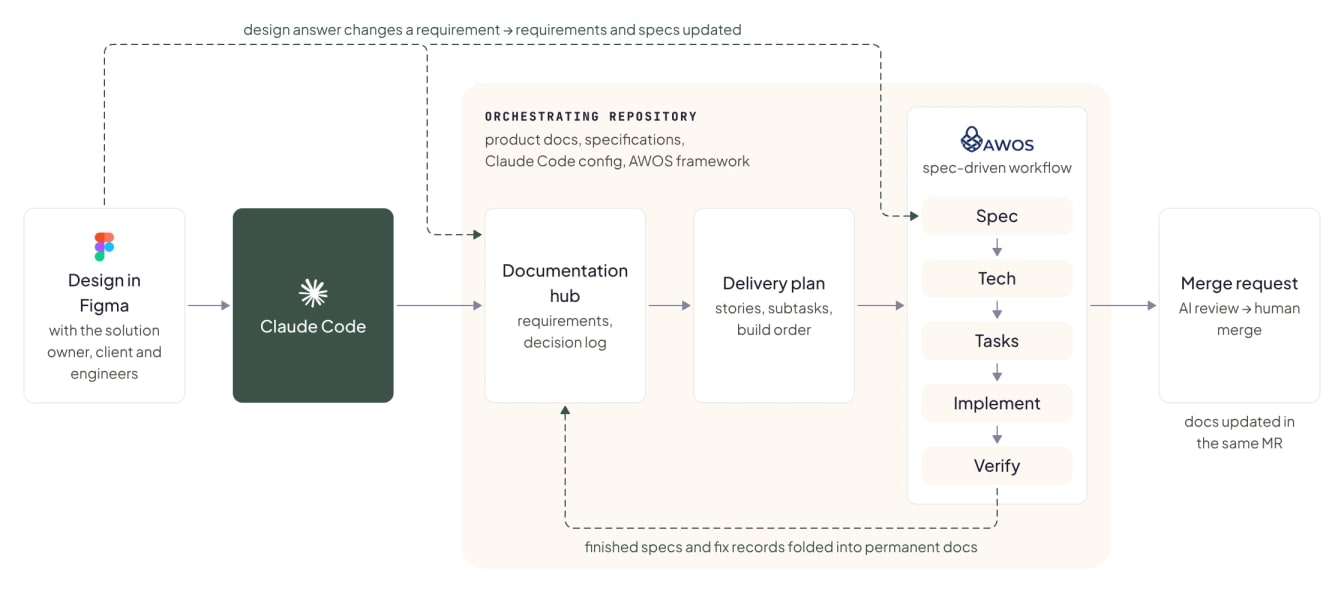
Once the design phase finished, Claude Code turned the designs into the documents we build from: the requirements in one documentation hub, the delivery plan and the specifications. A specification describes one piece of work with its acceptance criteria; developers build each one with Claude Code, and the criteria are checked against the running system. When an answer from design review changed a requirement, we updated the requirements and the affected specifications the same way, so the documentation kept pace with the design.
“Claude Code changed what counts as the source of truth,” says Oleg Galenia, our Tech Lead. “The requirements hub was created from the Figma design and has absorbed every design answer since, and each specification was written from it rather than from a ticket.”
The project runs from one orchestrating repository that holds the product documentation, specifications, the Claude Code configuration and AWOS, Provectus’ open-source spec-driven framework. Each service lives in a separate repository with a separate pipeline, and the setup script clones them all. A separate article describes the setup.
The team runs Claude Code under Provectus’ Claude Team plan, which follows Anthropic’s commercial terms, so sessions are not used to train models. The module is built and tested on sample data only, and project rules keep production credentials out of the AI’s reach.
What it looked like on this project:
Four months of design, then one day to plan. Design and requirements work ran from May until the design was agreed in September. From the agreed Figma design, the full decomposition was then produced with Claude Code in one working day: 10 stories, subtasks by layer, and the order to build them in.
5 of 10 modules in about seven weeks. About seven weeks after the first code reached the test environment, five modules are complete there, among them the foundation, templates, calendar and the map-plus-list dashboard.
36 specifications, each with its acceptance criteria. A criterion counts as verified once it has been checked against the running system (interface criteria in a real browser, API and data criteria with direct requests) and marked off with the measured evidence; about 90% of roughly 1,270 criteria are checked off so far. Almost every specification also ships with unit or component tests, four flows have end-to-end browser tests, and about 40 finished tickets have been through manual QA.
AI review before merge. About 95% of merge requests went through an AI review cycle before a developer merged them, typically two rounds with a few fix commits each.
The documentation keeps up with the code. A cleanup command keeps the archive of working documents from growing: specifications and records of fixed bugs older than two months, whose work is done, are folded into permanent documentation, removed if there is nothing worth keeping, or left for a person when something cannot be confirmed. Nothing is deleted until a developer confirms it. Its first run closed 9 of the 12 eligible specifications and left 3 for a person. The team also added a second safeguard for work done outside the spec-driven workflow, for example in plan mode or on a plain request: whenever Claude Code changes business logic, data storage or screens, it gets a reminder to update that service’s documentation in the same merge request. The reminder blocks nothing; the author decides what to change, and review checks it.
08 One App for the Warehouse and the Field
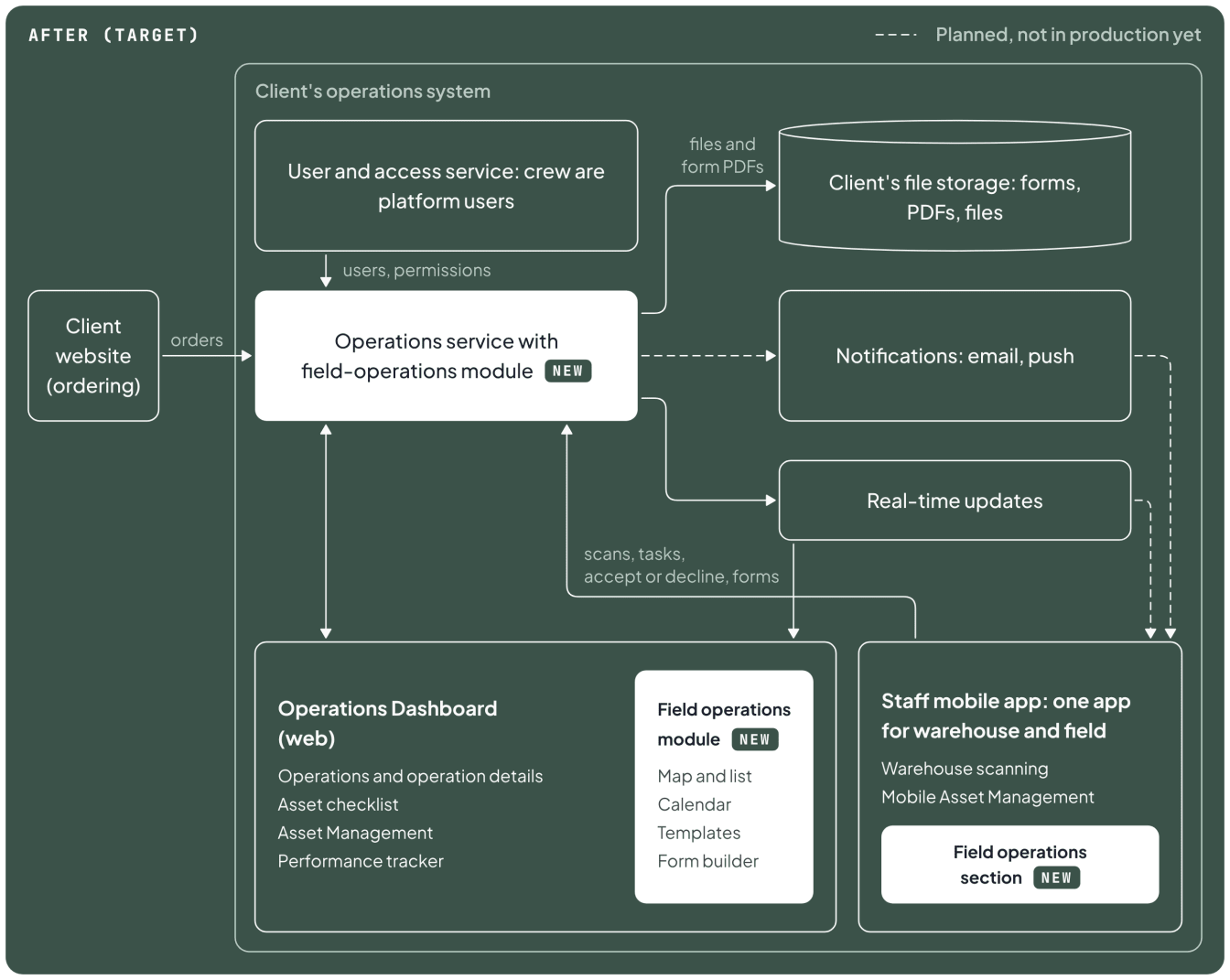
Our team had already built the client’s staff mobile app: first for the warehouse (scanning assets, consumables, racks and pallets to load and unload orders, and reporting items that need cleaning, repair or disposal), then with a mobile asset-management section and bulk scanning. Field operations becomes its third section. For crews, it shows the day’s operations, assigned across the crew, and the checklist forms that record the condition of the site before and after the job. The section does not track crew location.
Today crews use the vendor’s app next to ours. They keep it until the final go/no-go, so they always have a working fallback. After go-live, one app covers the warehouse and the field.
09 What We’d Do Differently
Cut tickets only after the design exists. The first set of tickets mirrored the PRD line by line and had to be replaced once the design showed the real structure of the application.
Confirm every attribute of the data model before it goes into the schema. We put every toggle drawn on the template frame into the data model. Within a few weeks the team agreed that three of them were not needed, and removing them cost two specifications and migrations.
Treat an open design question as a blocker for the specification. Three answers from design review arrived a week after the code that depended on them had already been merged into the module’s development branch, and each became a separate rework task.
10 Where We Are Now
The new module is on the test environment, and the first iOS test build of the crew’s app, with the new field-operations section, is with the team; its forms and notifications are still waiting for their back end. Still ahead are synchronization with the operations dashboard, moving all existing operations, templates and forms over from the vendor platform, and switching it off. The cutover is planned step by step, environment by environment, with the vendor platform kept running until a final go/no-go in production. The build is planned to finish by the end of the year; go-live follows the client’s acceptance testing, as it did for the asset-tracking module.
One risk is still open: the crew section needs a connection, so at a site with no signal a crew member’s work waits until the phone reconnects. A saved unfinished form keeps what was already entered.
Once the module is live, operations will appear the moment they are created, with no webhooks between two systems and one set of user accounts, and the client’s team will edit templates and forms in the new module. The same Provectus team that maintains the client’s operations system will maintain the new module. The client owns the module’s code and documentation, and because the documentation is kept current with the code, another team could take the module over.
If you are weighing whether to replace a vendor platform, we can plan and build the replacement with your team the same way: design first, then spec-driven development with AWOS and Claude Code. The Agentic SDLC with Claude Code program brings this way of working to your engineering team.