Executive Summary
AI adoption among legal professionals is growing, but most of that adoption still lives on individual laptops. Two lawyers on our legal team each asked their Claude setup to draft an MSA from “the standard Provectus template” and got back two different agreements, built on different versions of the template. Each person’s Claude was drawing from a different context, and there was no shared knowledge layer holding the setups together.
We rebuilt around a single Claude Cowork project that mirrors our Google Drive structure and started moving the routine legal work onto it one function at a time. Today, roughly 38 hours of routine work per week runs without a human touching it, which frees the team to spend time on the work that needs a lawyer.
01 Where Personal Setups Stopped Working
Last month, a colleague and I were each preparing an MSA for a new customer. We both asked our own Claude setup to draft one from “the standard Provectus template” and got two different agreements: mine was built on the current June 2026 version, and colleague’s on the August 2024 version (the one we had retired), which was missing the latest changes to liability and data protection terms. Neither of us noticed until the drafts landed side by side in review.
The team’s personal Claude setups had no shared knowledge layer underneath them.
Like most legal teams, we started out cautious about AI on real work and that caution still applies. However, routine work is where our position changed once we built the right structure around the model.
The MSA incident was not isolated. Once we started looking, we saw the same pattern across other work. Two people reviewing the same incoming NDA got different reports: one Claude checked it against the current playbook, the other against whatever rules its owner had pasted into instructions months earlier (so the same clause came back GREEN for one of us and YELLOW for the other). Formatting differences were tolerable. Different risk classifications and different template baselines were serious. In legal, outputs must be interchangeable, built on the same agreed baseline and consistent enough that a colleague can review them without second-guessing where the variation came from or why.
The problem was that each person’s AI was drawing from a different context. Everyone had their own instructions, their own copies of templates and playbooks, and even their own assumptions about how Claude Cowork should operate.
This is not unique to Provectus’ legal team. Thomson Reuters’ 2026 AI in Professional Services Report found that generative AI adoption among legal professionals more than doubled between 2025 and 2026, from 31% to 69%. Separately, Adobe’s 2026 AI and Digital Trends Report found that 57% of organizations say AI is changing workflows faster than employees can adapt. Both reports describe individual adoption. Whether the same AI works the same way across a team is a separate question that the data does not answer.
Anthropic understands the problem, too. In May 2026, the company launched Claude For Legal with role-specific plugins and more than twenty legal integrations; firms like Freshfields rolled it out fast enough to see roughly 500% growth in Claude usage within six weeks. More lawyers using more AI in more workflows means more places where outputs can drift apart, unless a shared knowledge layer underneath holds them together.
02 The Shared Workspace Setup
We already had a shared Google Drive folder with templates, playbooks, and reference material. The goal was to build the equivalent of this knowledge layer for Claude: a shared space everyone works from, with restricted access and a clear structure.
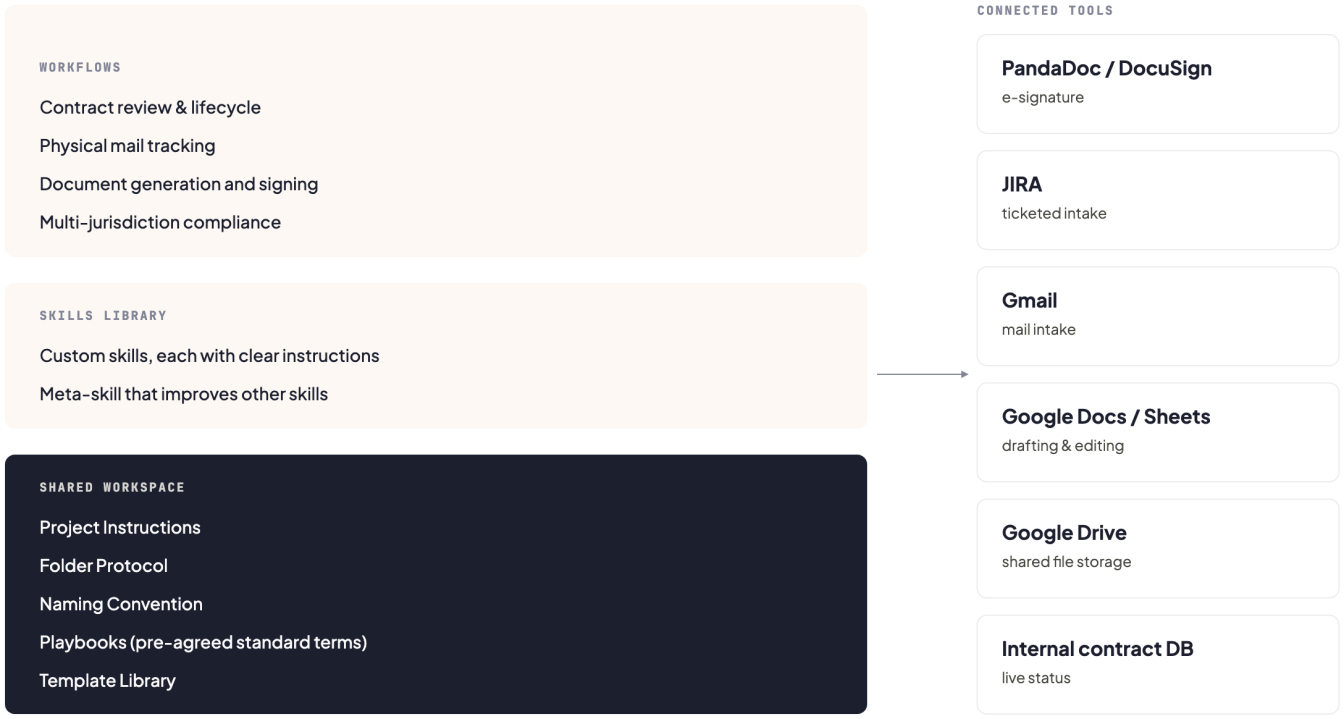
We set up a single Claude Cowork project that mirrors our existing folder structure. Inside it we store:
- Core reference material: company information, team context, and everything Claude needs to understand how we operate
- Contract playbooks with pre-agreed standard terms for each document type
- Corporate document templates ready for use
- A custom skills library with clear instructions for each skill
- Project Instructions that define the non-negotiable rules for how Claude works in our space
- A Folder Protocol governing the structure and rules for each section
- A Naming Convention that standardizes how new files are created and versioned
A Project Instruction of the kind we use, for example: “Never suggest a contract term that is not present in the current playbook. If a term would improve the contract but is not in the playbook, flag it as a proposal for peer review, not as the term itself.” Or a rule for citations: “Name the section of the playbook you drew from, so the reviewer can trace it.” Rules like these keep the shared skill from silently drifting when different lawyers use it.
The last three items in the list above tend to get skipped in most setups. They are also the things that keep a shared space from reverting to the same fragmentation it was built to solve. A shared folder without structure and ownership rules gradually becomes just another pile of documents.
The whole setup came together in about two weeks, with one person on the legal team putting in a few hours a day. Another week to roll it out and onboard the team. We built all of it ourselves, without technical help. The old N8N setup required IT support at every stage.
Everything the team runs on Claude runs on top of this structure. Skills pull the playbooks, templates, and instructions from underneath, and reach into the tools we already use (PandaDoc for signature-ready documents, JIRA for ticketed intake, our internal contract databases) when a workflow calls for them.
03 The Rules Underneath
Legal work has obligations that most other domains do not: client confidentiality, work-product privilege, and professional responsibility rules that apply whether or not AI is involved. Before we moved routine work onto the shared workspace, we set the ground rules.
Enterprise-tier data handling
We run Claude on an enterprise plan, which under Anthropic’s data policy does not train on customer inputs or outputs by default. That was table-stakes. ABA Formal Opinion 512, the ABA’s first ethics guidance on generative AI (July 2024), specifically flags self-learning tools as raising the risk that one client’s information could be exposed through use by another lawyer. Enterprise-tier Claude sidesteps that risk, and our Data Processing Agreement is on file.
Consumer AI stays off the work
In February 2026, the Southern District of New York ruled in United States v. Heppner that written exchanges between a defendant and a consumer-grade AI platform were not protected by attorney-client privilege or the work-product doctrine. The court treated the use of the consumer tool as a confidentiality break. The same month, Warner v. Gilbarco (E.D. Michigan) upheld work-product doctrine for AI-assisted internal analysis done at counsel’s direction. Together, the two decisions define the boundary. Privilege turns on the platform used and the process around the AI. Our team does not run client work on personal Claude accounts. Everything that touches a client matter runs inside the shared workspace under the enterprise data terms.
Human in the loop, always
Every workflow ends with a human review step before anything is sent, filed, or signed. On filings that go to regulators, the reviewer is a licensed attorney. On document generation, the reviewer is a lawyer from the legal team. The requesting business function does not sign off on its own request. The 38 hours per week we recovered are drafting, routing, and tracking hours. Judgment work still belongs to the reviewer.
We do not track a pass-rate percentage. What Cowork made easy is teaching the model to review documents against the pre-approved terms in our playbooks, so the work has shifted upstream. We keep the playbooks current, evolve them, and set the conditional terms. Claude then flags the areas that actually need a human eye. The quality of the output tracks the quality of the input.
One skill, one owner
Each skill has a designated owner on the team who keeps its outputs current, and every significant change goes through peer review before the shared version updates. That review layer stops one person’s untested prompt from becoming everyone’s default.
These rules made everything downstream defensible. Without them, the shared workspace would have been a productivity gain with an unresolved compliance risk.
04 What We Actually Run on Top of It
With the workspace in place and the ground rules set, we started moving the team’s routine work onto Claude one function at a time. Two broad areas now run on top of the shared workspace: operations and compliance.
Contract review and lifecycle
Claude reviews incoming customer agreements against our Provectus playbook, compares them clause by clause, and keeps a live status of every document by updating the internal database: what is active, what is expiring, what has already expired, what is still pending. The same setup runs for our vendor agreements. The register stays current on its own, reminders go out to the right people before anything expires, and critical renewals get escalated automatically.
We used to rely on N8N for the workflow triggers and the routing between our contract database and the reminder system. It worked, but it required a separate configuration no lawyer wanted to own. Even a basic document-triage flow meant stitching together separate APIs: one to extract and parse the text, another to analyze it, another to write up the report. Each service had to be configured and maintained on its own. Claude handles the whole flow now, inside the same skill that reads the contract, without a manual trigger. There are no API keys or configs to think about anymore.
Mail tracking
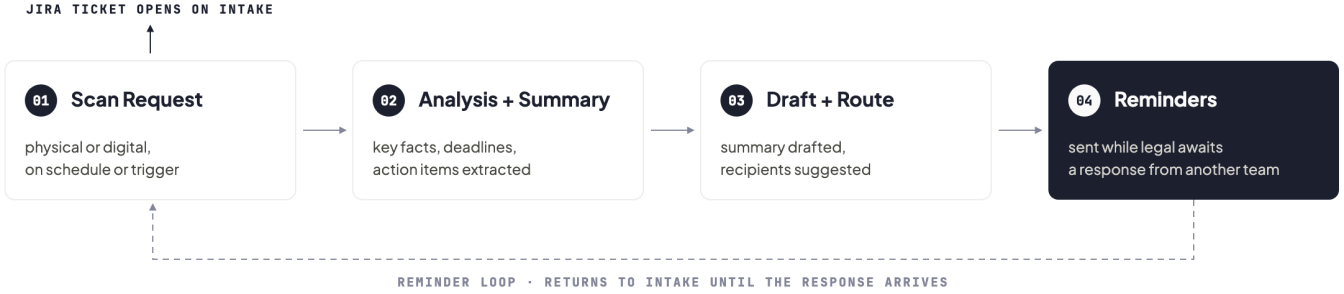
Incoming mail used to require manual review, routing, and follow-up, roughly four hours a week, with a standing risk of an item being missed or delayed. Now Claude runs the full cycle as a four-step workflow: it requests a scan of each item (physical or digital) on a schedule or trigger, extracts the key facts, deadlines, and action items, drafts a summary and suggests the right internal recipients, and sends reminders whenever legal is waiting on a response from another team. Every piece of mail is captured, summarized, routed, and tracked. Nothing gets lost, and the team wins back about four hours a week that used to go into collecting, reading, and chasing the post.
Document generation
New hires, contract amendments, and offboardings all used to require manual drafting and significant coordination. Now a single workflow produces the full document set (onboarding packages including employment contract, NDA, IP assignment, and benefits consent; amendments; offboarding docs including separation agreements, releases, and IP confirmations) with the right non-compete and non-solicitation terms based on the person’s role and location. For amendments, the workflow produces an automatic redline against the original. It reads the whole contract for context before proposing the change, so the redline reflects how the amendment interacts with clauses elsewhere in the agreement. Once ready, everything gets pushed straight into PandaDoc with the parties already set up, alongside the email communication and a clean audit trail. Documents that took days now take minutes.
Multi-jurisdiction compliance
Claude tracks our 50-state filing requirements in the US, monitors what is due, prepares the filings, and flags submissions. The same setup runs across Canada, where it tracks federal filing requirements under the CBCA and OBCA plus provincial obligations including Quebec’s Law 25 and PIPEDA. In Costa Rica, it covers Law 8968 and PRODHAB obligations, and Registro Nacional corporate filings, with filing documents prepared in Spanish.
On privacy, it watches for changes under GDPR (EU/UK), CCPA/CPRA (US), PIPEDA and Quebec’s Law 25 (Canada), and Law 8968 (Costa Rica) continuously, including DPA decisions, FTC actions, and court rulings. A DPA that used to take about 10 minutes of manual drafting and data entry now generates from the contractor data table in bulk: ten DPAs in under a minute.
None of these workflows would have been worth building on top of personal setups. Each one assumes the shared knowledge layer underneath, which makes it work the same way regardless of who runs it.
05 What Moved
Did any of this move the numbers? Yes. First, honesty about the measurement: we did not run a controlled study. The numbers below are the team’s estimates.
Roughly 38+ hours of routine work per week now run without a human touching them:
- About 5 hours from customer MSA/SOW and vendor tracking
- Around 4 from the mailbox workflow
- Roughly 18 across document drafting: ~6 hrs for onboarding packages, ~4 hrs for contract amendments, ~8 hrs for offboarding docs
- About 11 from compliance monitoring
Four workflow areas run end-to-end. Ten-plus jurisdictions are monitored continuously. Roughly 85% of our routine tasks (the recurring, template-driven work: standard MSAs, NDAs, filings, and onboarding packages) now happen without anyone touching them. Documents that used to take days take minutes. Deadlines no longer depend on someone remembering them. Privacy changes reach us early, before they become a problem.
Beyond the numbers, four things changed in the day-to-day work.
The variations we used to catch in peer reviews stopped showing up
Two lawyers reviewing the same contract type no longer produce different indemnification or limitation-of-liability terms by accident. They diverge only when one of them deliberately edits the standard. The baseline lives in one place now, so it can only be one thing.
New joiners produce team-standard output on their first day
Getting a new lawyer up to speed on our standards used to take weeks. It could take months in the more specialized areas. Now a new joiner can start contributing almost immediately, because the contract review skill carries the playbook and the standards. They do not have to rebuild that context inside a personal setup before they can contribute anything useful. They learn on the job by reading triage-report outputs and comparing them against the playbooks. What used to be a slow, solitary deep-dive is now an ongoing flow where the whole team stays on the same page and standards get refined together as work moves through.
Good improvements stay in circulation
When one of us finds a better way to structure a clause or a better prompt for a recurring task, we propose the change to the skill’s owner. It goes through peer review, becomes the shared version, and the next person to run the skill picks it up. Previously, that improvement would have lived in one person’s setup until they happened to mention it in a Slack thread.
The “whose version is the latest” conversation stopped
We no longer spend time reconciling which copy of a template is authoritative, because there is one copy and Claude pulls from it.
06 What’s Next
The 38 hours a week are a budget for what the team does next. The reason to win them back is to spend the time on work that needs a lawyer. The ROI on legal AI is measured in the work the team can now do that it never had room for before.
For us, that means going deeper on the non-routine compliance questions we never had time for, keeping more research in-house (roughly ~$15–20K a year we used to send to outside counsel for routine research and regulatory analysis), and acting as a strategic partner to the business.
There is also a capacity dimension. Faster document processing and review means more room to take on the growing volume of new customer requests. Whatever budget is left goes into building the next batch of automations, so the loop of improvement keeps running.
Three specific things we are building next:
- A proper internal contract-management system, with different layers of access for different departments and teams. Access is role-based, so each department sees only what its work requires.
- A contract legacy feature, which takes a document along with all its amendments and addendums and combines them into one clean, current, readable version. You see the current wording of the contract in one place, without digging through five separate files.
- A knowledge base of pre-approved answers for the questions that keep coming up in customer questionnaires. A large part of onboarding a customer is filling out KYC and due-diligence forms. Anyone in the company working on one will be able to invoke a skill, and Claude will fill the form out from the approved data. That removes the recurring back-and-forth across legal, security, and finance for the same answers.
Skills that improve other skills
We did not plan for this when we started, but once skills became shared infrastructure, we could build skills that improve other skills. We developed one specifically for creating and refining the rest of our library. It reads an existing skill’s instructions, tests them against sample inputs, suggests changes, and tracks version history as the system evolves. In a shared workspace, every improvement this tool produces reaches the whole team.
The plan is to keep going the same way. Grow the skills library. Retire the pieces still done by hand. Rely on the skill that improves other skills so every upgrade lands once and reaches everyone.
A year ago, most of this would have needed a developer. Now it does not. Ideas like these are more achievable for non-technical teams than they have ever been.
07 What This Means for Legal Teams
Most legal teams in 2026 are already using AI. Axiom’s 2025 in-house legal AI report found that only 21% have reached AI maturity, despite widespread adoption. The harder problem now is whether the AI running across the team pulls from the same source of truth. Without that, the productivity gains AI was supposed to deliver get eaten by coordination overhead and rework.
Three questions worth asking your team first:
- Where does our shared AI context live, and who owns it?
- If two people on the team ran the same skill on the same input tomorrow, would the outputs be interchangeable?
- What stops a new joiner from being productive with our AI setup on day one?
If you cannot answer the first one, the other two answer themselves.
We are sharing what we build, and what we learn from building it. If you are working through similar questions on your team, we would be glad to compare notes.