The client is a US consumer company that runs its own field crews. Dispatchers plan each day’s operations on a map and a list, crews take the work on their phones, and every completed job ends with a checklist. Provectus, an AI-first systems integrator, maintains the client’s operations system day to day and built its staff mobile app.
01 The Challenge
Field operations ran on a platform the client could not change
Since 2022 the client’s field operations had run on a third-party platform with no source-code access, connected to the client’s operations system through an integration Provectus maintained. Two systems had to agree on every task and every crew assignment, and the ticket history shows the cost: between 2022 and 2026, dozens of tickets named the platform, about half of them bugs.
The vendor’s limits became the team’s work. The vendor switches webhooks off after repeated non-200 responses, delivers some events two or three times, and has undocumented endpoints. Completed checklists failed to reach the operations dashboard more than once.
The subscription added a direct cost. The client paid for dozens of seats, including pending invitations and service accounts, and its requirements describe features nobody used. That pattern is common: the average organization uses 54% of the SaaS licenses it pays for, according to the 2026 SaaS Management Index from Zylo, a SaaS management software company. Historical checklist PDFs were stored only on the vendor’s servers and would go with the subscription.
The client had replaced a vendor tool before. In 2025 Provectus moved its asset tracking into a module in the client’s system, built without Claude Code: about 10 months from first commit to an overnight cutover that moved more than 70,000 assets. With that data in its own system, the client got features the vendor tool did not offer, such as inventory forecasting. More companies are making the same call: 35% of enterprises in the 2026 Build vs. Buy survey by Retool, a platform for building internal software, have replaced at least one SaaS tool with custom software.
The client wanted field operations inside its own system, on one condition: dispatchers and crews, fluent in the old interface, would not have to relearn their jobs.

02 The Approach
Requirements settled in the design, screen by screen
The starting point was the client’s requirements document. It described part of the application in detail and other parts barely at all, and it mostly listed what should change, assuming the reader already knew the old system.
To fill the gaps, the team first went through the vendor’s screens (dashboard, task details, calendar, templates, forms) and listed questions. The forms, operation templates and statuses the client had set up in the platform showed which features it used and which it did not. That answered most of what the document left open, so the client got a short list of direct questions, and no formal user interviews were needed.
Next, the designers built an interactive prototype with Claude from the client’s current dashboard designs, the requirements document and the client’s design system, so the prototype used the client’s real styles. Building it found details the requirements had simplified or skipped, from how certain operations work to how many kinds of operation there are.
The designers then drew the final screens in Figma with the project’s solution owner, the client and the engineers. Each question was settled in the comment thread on the screen it concerned. When a thread could not settle one, the team asked the client directly: asked which statuses a manually created operation should have and who may change them, the client answered with an eight-step lifecycle.
More than 80 design decisions are recorded with the thread they came from. About 20 of them drop or defer a vendor feature, each with its reason: unused, covered by an existing platform service, or deferred for regression risk. The map-plus-list dashboard stays, and operation colors come from the vendor’s templates, rendered softer.
03 The Build
Claude Code turns the design into a plan, specifications and documentation
Once the design settled, Claude Code turned it into the documents the team builds from:
- A documentation hub for the module, with the requirements derived from the design, the decision log, the decomposition, the technical baseline and the environment rules. It is updated with Claude Code after every answer from design review.
- A plan of 10 modules (stories), with subtasks by layer and dependencies, produced with Claude from the Figma design in one working day.
- More than 30 specifications, written from the hub and implemented through a spec-driven workflow. When a design answer changes a requirement, the affected specification is updated the same way.
- An AI review on every merge request, with fixes made on the branch before a developer merges.
The documentation keeps pace with the code through two mechanisms. A cleanup command goes through working documents older than two months whose work is complete: it moves what is still true into permanent documentation, removes what has nothing worth keeping, and leaves anything it cannot confirm for a person. A developer confirms every change it proposes. Its first run closed 9 of the 12 eligible specifications and left 3 for a person. Separately, whenever Claude Code changes business logic, data storage or screens, it is prompted to update that service’s documentation in the same merge request.
The work runs from one orchestrating repository that holds the product documentation, architecture notes, specifications, the Claude Code configuration and AWOS, Provectus’ open-source spec-driven framework. Each service keeps a separate repository and pipeline, and a setup script clones them all. The project’s tech lead described the setup in “One Orchestrating Repo: Spec-Driven Development Across a Live Multi-Repo Product”.
The module reuses the client’s design system and existing platform services: users and roles, permissions, notifications, file storage, real-time updates, and the fleet and geofencing integration.

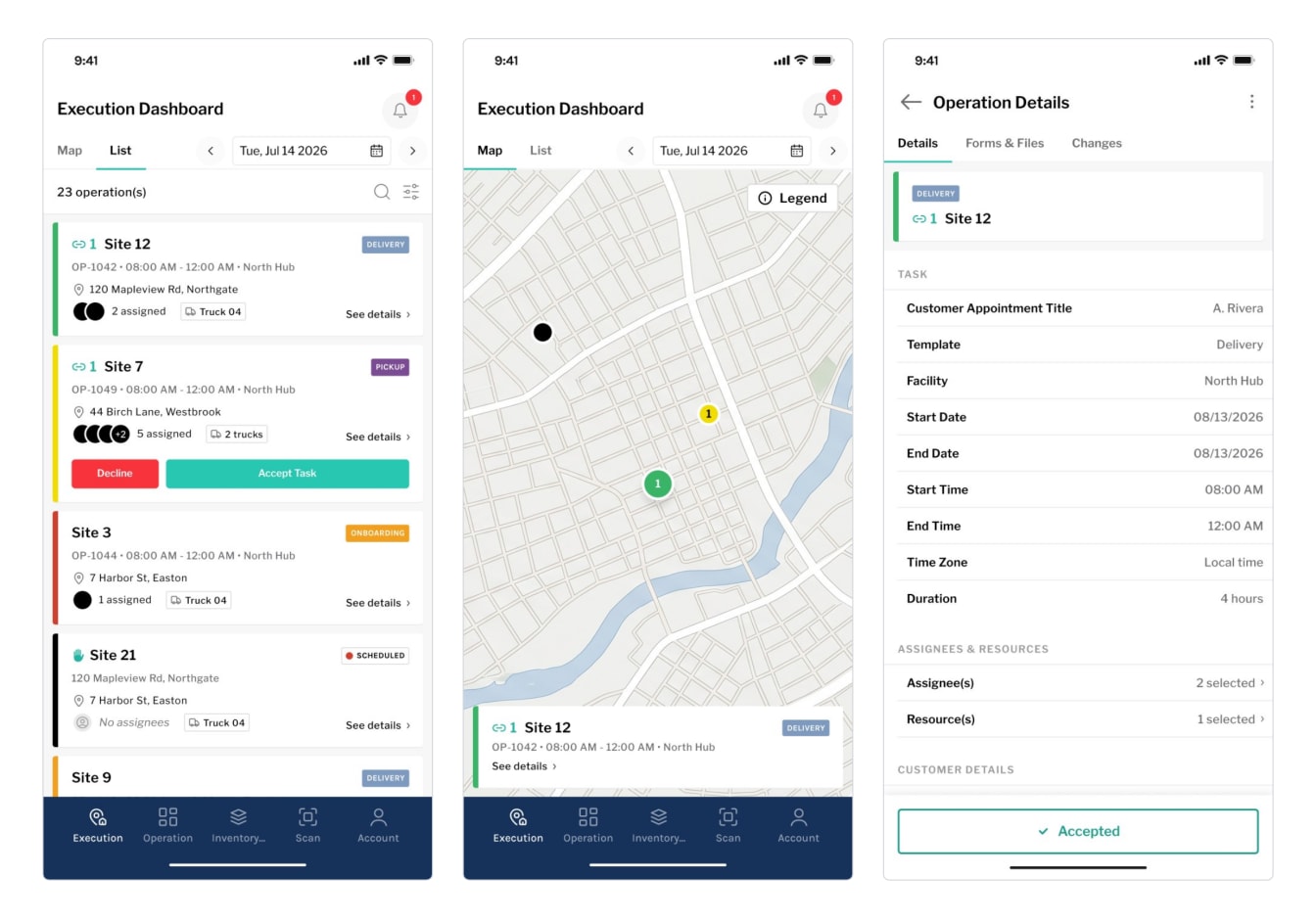
Field operations become the third section of the staff mobile app, after the warehouse section (scanning assets, consumables, racks and pallets, loading and unloading orders, reporting damaged items) and asset management with bulk scanning. Crews will use one app for the warehouse and the field, and the vendor’s separate app comes off their phones.
04 The Results
The core of the new module is running on the test environment
About six weeks after the first code reached the test environment, the platform foundation, operation templates, the calendar (month, week and day views) and the map-plus-list dashboard are complete.
4 of 10
Modules (stories) complete
Within six weeks on the test environment
The operation details page and manual operation creation are built and in QA. The crew’s mobile module (day list, map, operation details, form filling and notifications) is built, and a first iOS test build is in review; forms, change history and notifications run on placeholders until their back end is ready. The form builder, that back end and the status lifecycle for manual operations are in progress.
Still ahead are synchronization with the operations dashboard, the migration of existing operations, templates, forms and historical checklists, and the vendor switch-off. No production date has been set.
Once the module is live, the client expects:
- operations to appear the moment they are created; today they appear after design or assignment, a delay the client’s requirements called out
- one system for tasks and crew assignment, with no webhooks to lose
- crews signed in as users of the client’s system with its roles, and the paid vendor seats gone
- templates and forms edited by the client’s team without development work
- historical checklists stored in the client’s own storage
05 What’s Next
A step-by-step cutover, then the vendor switch-off
The new module will run alongside the vendor platform environment by environment (development, staging, then production) until a go/no-go in production. After that, the vendor integration is removed and the subscription canceled. The client’s wish list for the module already includes AI-assisted crew suggestions and search.